A1 Poster: https://drive.google.com/file/d/1OizzTm0fxBVQ_22NNkBvDMQXY40NOrQn/view?usp=sharing
A2 Poster: https://drive.google.com/file/d/1l3L_nFFEKPt88NAA78OngiIP6crjjtJS/view?usp=sharing

Wednesday, December 12, 2018

Friday, June 8, 2018
Blender 3D Game Development (Workshop for First City University College)
Blender 3D is an open source software for 3D animation as well as game development tool.
With a group of people contribute to the software, it give a chance of everyone who wanted to learn 3D animation or 3D game development.
In this workshop, I am going to demonstrate the power of Blender 3D of creating simple game without using coding skill. This game consists of two levels and player is going to locate the portal to next level of the game.
Organization Unit: First City University College
Faculty: Faculty of Engineering and Computing
Title: Blender 3D Game Development Workshop
Date: 10 June 2018
Duration: 8 hours
Agenda:
0930 - 1200 Workshop
1200 - 1300 Lunch Break
1300 - 1500 Game Development Competition
Guide Book for Download
With a group of people contribute to the software, it give a chance of everyone who wanted to learn 3D animation or 3D game development.
In this workshop, I am going to demonstrate the power of Blender 3D of creating simple game without using coding skill. This game consists of two levels and player is going to locate the portal to next level of the game.
Organization Unit: First City University College
Faculty: Faculty of Engineering and Computing
Title: Blender 3D Game Development Workshop
Date: 10 June 2018
Duration: 8 hours
Agenda:
0930 - 1200 Workshop
1200 - 1300 Lunch Break
1300 - 1500 Game Development Competition
Guide Book for Download
Wednesday, June 21, 2017
Simple Avoidance Game with Flash CS6 (Workshop for Firstcity University College)
Simple Avoidance Game with Flash CS6
This is a tutorial that will show you how to create a simple avoidance game using ActionScipt version 3 in Adobe Flash CS6. The following is the screen captured for the appearance of this game. There are only two characters in the game. Enemy will drop from the sky and the cute little jelly man is going to avoid the enemy. One mark will be granted if jelly man successfully avoid being hit by the enemy drop from the sky. In addition, any successful avoidance will increase the dropping speed of the enemy which create some difficulty to the game and enhance the playability of the game.

At the beginning of the game, we need to plan and organize the game. First of all, we need to define the goal of the game. The restriction of the game. The condition that will end the game. The highest mark will be granted to those who can avoid the enemy at the longest time.
Goal of the game: The jelly man has to avoid being hit by enemy as long as possible.
Restriction of the game: The jell man can move left or right (controlled by left and right keys beside the number pad). The enemy will randomly drop from the sky.
Condition Ending the game: If the jelly man is hit by the enemy the game end.
Then, design the background scene. Normally I will place ground at one layer, tree at one layer, sky at one layer, cloud at one layer, characters at one layer, mark at one layer and finally a layer for script.
We will create all necessary for the scene accordingly. Let's start with creating movieclips in Flash.
Creating Movie Clip
In the step, we need to create characters in the game (enemy and jelly man), NPCs (trees, ground, cloud and sky). We need to convert this image to movieclip in Flash and store in the Library so we can used them later in the game scene.Let use the Flash drawing tool to create the tree look similar to the following:
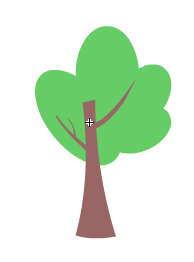


Create your cloud, sky and ground respectively at your own creativity.
Make characters and NPCs available in the scene
Place the characters and NPC to the respective layer as shown as the following: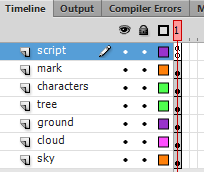
Drag one enemy to the stage. Give a name to this character so that the script can interact with it. In this case, named it enemy.
Drag one enemy to the stage. Give a name to this character so that the script can interact with it. In this case, named it hero.
Create a text box at the right upper corner and named it mark. Change the text to dynamic as it can be updated by the script.
Create the script section for the game
Select the script layer, press F9 to enter script editing window. Copy and paste the following code into the window.stage.addEventListener(KeyboardEvent.KEY_DOWN, pressedButton);
stage.addEventListener(Event.ENTER_FRAME, onEnter);
var score:Number = 0;
var enemy_speed:Number = 5;
var size:Number = 60;
var step:Number = 6;
function init():void{
enemy.x = size/2;
hero.x = size/2;
}
init();
function randomRange(minNum:Number, maxNum:Number):Number{
return (Math.floor(Math.random()*(maxNum-minNum))+minNum);
}
function onEnter(e:Event){
enemy.y = enemy.y + enemy_speed;
if(enemy.y > stage.stageHeight){
enemy.y = -size;
var num:Number = randomRange(0,step+1);
enemy.x = num*size+size/2;
score = score + 1;
mark.text = String(score);
if (stage.frameRate <= 60){
stage.frameRate = stage.frameRate + 5;
}else{
stage.frameRate = 60;
if(enemy_speed <= 25){
enemy_speed +=1;
}else{
enemy_speed += 25;
}
}
}
if(hero.hitTestObject(enemy)){
stage.removeEventListener(KeyboardEvent.KEY_DOWN, pressedButton);
stage.removeEventListener(Event.ENTER_FRAME, onEnter);
stage.frameRate = 24;
}
}
function pressedButton(event:KeyboardEvent) : void
{
if(event.keyCode == Keyboard.LEFT && hero.x >= size){
hero.x = hero.x - size;
}else if (event.keyCode == Keyboard.RIGHT && hero.x <= step*size-size){
hero.x = hero.x + size;
}
}
Play the game by pressing CTRL+ENTER.
The executable version of game is available in the link: https://www.dropbox.com/s/7i921ttldsab4dn/SimpleAvoidanceGame.swf?dl=0
The executable version of game is available in the link: https://www.dropbox.com/s/7i921ttldsab4dn/SimpleAvoidanceGame.swf?dl=0
Saturday, December 3, 2016
Tuesday, September 6, 2016
Condition Statement in PHP
Program is a set of instructions for computer to execute. It is important to tell the computer when to execute an instruction and when not to. Thus, the condition statement has become a very important code in programming language. A proper planned condition statement may make the computer execute "WISELY". An artificial intelligent nothing but a bunch of condition statement to help computer to decide the next move.Type of condition statement in PHP
- If (condition) { ….. }
- If (condition) { ….. } else { ….. }
- If (condition) { ….. } else if(condition) { ….. } else { ….. }
- switch (var) { case x: …..; break; case y: …..; break; }
If (condition) { ….. }
This is the simplest form of conditional statement. This statement will check whether the condition is TRUE to execute block of codes within the curly brace.
<?php
$age = $_POST['age'];
if($age>18){
echo "You are adult!";
}
}
?>
If (condition) { ….. } else { ….. }
This condition statement contain two possible states (TRUE or FALSE). This statement will check whether the condition is TRUE to execute the first block of code and otherwise execute the second block of code in the else block.
<?php
$age = $_POST['age'];
if($age>18){
echo "You are adult!";
}else{
echo "You are just a kid";
}
}else{
echo "You are just a kid";
}
?>
If (condition) { ….. } else if(condition) { ….. } else { ….. }
This condition statement contain multiple possible states. If the first condition is true, the first block of codes will be executed Otherwise, if second condition is met, the second block of codes will be executed.
<?php
$age = $_POST['age'];
if($age>0 and $age<=1){
echo "You are Infant!";
}else if($age>1 and $age<=3){
echo "You are toddler";
}else if($age>3 and $age<=18){
echo "You are child";
}else if($age>18){
echo "You are adult";
}
}else if($age>1 and $age<=3){
echo "You are toddler";
}else if($age>3 and $age<=18){
echo "You are child";
}else if($age>18){
echo "You are adult";
}
?>
switch (var) { case x: …..; break; case y: …..; break; }
This condition statement contain multiple possible states. If any of this condition is true, the case block of that particular code will be execute.
<?php
$menuOption = $_POST['option'];
switch($menuOption){
case 1: echo 'Show Record';
break;
case 2: echo 'Add Record';
break;
case 3: echo 'Delete Record';
break;
case 4: echo 'Update Record';
break;
default: echo 'Invalid Option';
break;
}
?>
Form and PHP code
Methods to send Form data
There are two methods to send user inputs to script:
POST method is a safer method as the inputs will be send by attaching to the trail of the HTTP protocol.
- GET
- POST
POST method is a safer method as the inputs will be send by attaching to the trail of the HTTP protocol.
Data passed from FORM
$_GET is an array contains values passed using GET method. Syntax: $_GET [name] where name is the name attribute of form element$_POST is an array contains values passed using POST method. Syntax: $_POST [name] where name is the name attribute of form element
Options to handling FORM with PHP:
- Separated form and PHP code.
- PHP code and form in a single PHP file
Separated form and PHP code.
The easiest way to handle user input is used separated form and script. In this case, you need to create a form in HTML file. And, in the action attribute specify the PHP file that handle input from this file.
form.html
<form action="process.php" method="get">
Age : <input type="text" name="age" />
<input type="submit" name="submit" />
</form>
process.php
<?php
echo $_GET['age'];
?>
form.html
<form action="process.php" method="get">
Age : <input type="text" name="age" />
<input type="submit" name="submit" />
</form>
process.php
<?php
echo $_GET['age'];
?>
PHP code and form in a single PHP file
In this option, the PHP file consists of two roles: display form and process the input. PHP file has to determined when to display a form and when to process the input. It is very critical as the PHP code cannot process the task if there is no data from the form. Thus, we need to check whether the user has submitted the form. If the user did not submit form, display form for user input. If the user has filled in the form and pressed the submit button, Then, PHP will process the inputs from user.
registration.php
<?php
if(isset($_POST['submit'])){
// process the task as the submit button is pressed
}else{
// Display the form if the submit is not detected.
?>
<form action="process.php" method="get">
Age : <input type="text" name="age" />
<input type="submit" name="submit" />
</form>
<?php
}
?>
registration.php
<?php
if(isset($_POST['submit'])){
// process the task as the submit button is pressed
}else{
// Display the form if the submit is not detected.
?>
<form action="process.php" method="get">
Age : <input type="text" name="age" />
<input type="submit" name="submit" />
</form>
<?php
}
?>
Fundamental of PHP
- PHP code must be enclosed within a block: <?php ……. ?>
- Multiple PHP blocks are allowed in a single document.
- HTML tags can be used within PHP document.
- PHP file can be only executed in web server. It cannot run as a normal HTML file in the local file system.
- End each statement with a semicolon (;)
- Variables start with $ and it is scalable type (no need to declare before used)
- Variable name cannot start with number and it can be any alphanumeric value after the first character.
- echo is function that can print output to browser
- Form is an user interface that accept users input for server to process.
- Form must contains two attributes: action and method. Action attribute specified the script or program that will handle the input. Method is the sending method used (GET or POST). And, a submit button that will do the sending according to these two attributes.
PHP code must be enclosed within a block: <?php ……. ?>
HTML tags do not work within the PHP block. It must use echo function to output them to the browser.
<?php
echo "<H1>Heading Text</H1>";
echo "<P>Paragraph</p>";
?>
<H2>Sub Heading Text</H2>
<p>Paragraph in Sub section</p>
<?php
echo "<H1>Heading Text</H1>";
echo "<P>Paragraph</p>";
?>
<H2>Sub Heading Text 1</H2>
<p>Paragraph in Sub section</p>
<?php
echo "<H2>Sub Heading Text 2</H2>";
echo "<p>Paragraph in Sub section</p>";
?>
<?php
echo "<H1>Heading Text</H1>";
echo "<P>Paragraph</p>";
?>
<H2>Sub Heading Text</H2>
<p>Paragraph in Sub section</p>
Multiple PHP blocks are allowed in a single document.
HTML tags can be used within PHP document.
End each statement with a semicolon (;)
<?php
echo "<H1>Heading Text</H1>";
echo "<P>Paragraph</p>";
?>
<H2>Sub Heading Text 1</H2>
<p>Paragraph in Sub section</p>
<?php
echo "<H2>Sub Heading Text 2</H2>";
echo "<p>Paragraph in Sub section</p>";
?>
Variables start with $ and it is scalable type (no need to declare before used)
Variable name cannot start with number and it can be any alphanumeric value after the first character.
echo is function that can print output to browser
<?php
$B2B = true;
// $1MDB = "News"; <- Invalid variable start with number
$age = 25;
$name = "Johnson";
$years = 3.5;
echo "Name : ".$name."<br />Age : ".$age;
Form is an user interface that accept users input for server to process.
Form must contains two attributes: action and method. Action attribute specified the script or program that will handle the input. Method is the sending method used (GET or POST). And, a submit button that will do the sending according to these two attributes.
<form action="process.php" method="get">
Age : <input type="text" name="age" />
<input type="submit" name="submit" />
</form>
Subscribe to:
Posts (Atom)